Best Laptop for Programming (2026): Complete Buying Guide
Looking for the best laptop for programming? Compare CPUs, RAM, MacBooks, Windows laptops, and top picks for coding, AI, and software development.
Enjoying this? Sign up to earn credits just for reading. Create free account
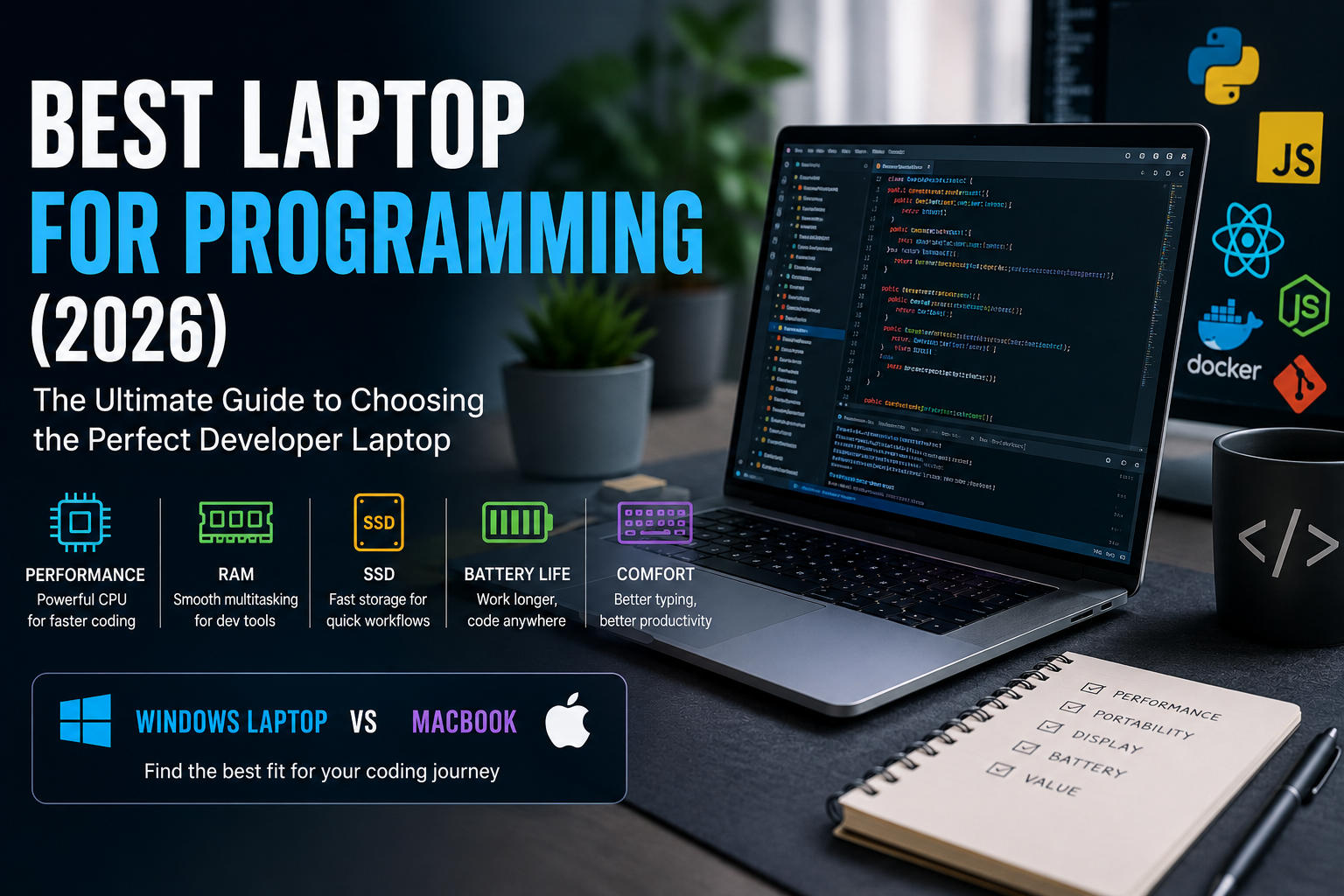
Finding the best laptop for programming can significantly improve your productivity, coding experience, and long-term workflow. Whether you're a beginner learning Python, a software engineer building enterprise applications, a web developer working with JavaScript frameworks, or an AI engineer training machine learning models, choosing the right laptop matters.
Today's development environments are far more demanding than they were just a few years ago. Modern IDEs such as Visual Studio, IntelliJ IDEA, Android Studio, and Xcode consume considerable system resources. Developers also run Docker containers, virtual machines, local databases, browser testing environments, and cloud development tools simultaneously.
As a result, selecting the right programming laptop is no longer simply about buying the fastest processor. Battery life, keyboard quality, RAM capacity, storage speed, display quality, portability, and operating system compatibility all contribute to an excellent coding experience.
In this complete buying guide, you'll learn exactly what to look for when choosing the best laptop for programming.
Why Choosing the Right Programming Laptop Matters
A slow laptop doesn't just waste time it interrupts concentration. Long compilation times, slow application launches, overheating, noisy fans, and short battery life all reduce productivity.
The best programming laptops allow developers to:
Compile code faster
Run multiple development tools simultaneously
Test applications efficiently
Work remotely for long hours
Enjoy a comfortable typing experience
Minimize interruptions caused by hardware limitations
Buying the right laptop is an investment in your daily workflow.
Best Laptop for Programming: Minimum vs Recommended Specifications
Component | Minimum | Recommended | Professional |
|---|---|---|---|
CPU | Intel Core i5 / Ryzen 5 | Intel Core i7 / Ryzen 7 / Apple M-Series | Intel Core Ultra / Ryzen 9 / Apple M4 Pro |
RAM | 8GB | 16GB | 32GB–64GB |
Storage | 256GB SSD | 512GB SSD | 1TB SSD |
Display | Full HD | 2K IPS | 4K / OLED |
Battery | 6 Hours | 10+ Hours | 15+ Hours |
Best CPU for Programming
The processor affects almost every development task. Programming workloads that benefit from powerful CPUs include:
Compiling software
Running virtual machines
Docker containers
Android Studio
Game engines
AI frameworks
Excellent processor choices include:
Intel Core Ultra Series / Core i7
AMD Ryzen 7 / Ryzen 9
Apple M3 / M4 / M4 Pro
For most developers, an 8-core processor provides an ideal balance between performance and efficiency.
How Much RAM Do Programmers Need?
RAM is often more important than many beginners realize. A typical developer's memory usage might include:
VS Code / Heavy IDEs
Chrome (20+ tabs)
Docker containers
Slack / Microsoft Teams
Local Database
Terminal & Git
Figma / Design tools
These applications can easily consume more than 12GB of memory.
Recommendation Breakdown:
8GB → Learning and lightweight coding only
16GB → Most general developers and web developers
32GB → Mobile development (Android Studio), Docker, and local AI workflows
64GB → Heavy enterprise workloads, large-scale data processing, and virtualization
SSD Storage for Developers
Never purchase a programming laptop with an HDD. SSD storage dramatically improves:
Boot time
File indexing
Project loading
Compilation speeds
IDE responsiveness
Recommended capacity:
512GB SSD as a baseline standard.
1TB SSD for industry professionals and those managing large local assets/databases.
Windows Laptop vs MacBook for Programming
One of the biggest questions developers ask is whether to choose Windows or macOS. If you're deciding between a Windows laptop and a MacBook for programming, it's essential to weigh their core strengths.
Windows laptops offer exceptional flexibility, broader hardware choices, easier component upgrades, and better compatibility with gaming and specialized architecture software.
MacBooks provide industry-leading battery life, excellent build quality, powerful Apple Silicon processors, and a native Unix-based operating system that many developers prefer for web, iOS, and cross-platform development.
Advantages of Windows Laptops
Huge hardware selection and competitive pricing
User-upgradeable hardware (RAM/Storage on many models)
Superior gaming and graphics support
Best for: C#, .NET ecosystem, Unreal Engine, Unity, Cybersecurity, and Data Science.
Advantages of MacBooks
Outstanding battery life and virtually silent operation
Premium keyboards and high-resolution Retina displays
Native Unix terminal environments
Excellent optimization with Apple Silicon
Best for: iOS/macOS Native Development, Flutter, React Native, Front-end Development, and general web engineering.
The Linux Factor: An Essential Consideration
For backend engineers, DevOps specialists, and systems programmers, Linux remains a top choice. While you can buy dedicated Linux laptops (like System76), most developers choose a compatible Windows laptop (such as a Lenovo ThinkPad or Dell XPS) and dual-boot it or overwrite Windows with Ubuntu, Fedora, or Arch Linux. Alternatively, Windows Subsystem for Linux (WSL 2) offers a near-native Linux environment directly inside Windows.
Click here to read the full comparison.
Business Laptop vs Gaming Laptop for Programming
Many beginners assume gaming laptops are automatically the best choice because of their raw specs. This is a common misconception.
Unlike gaming laptops, business laptops often prioritize battery life over GPU performance. They are typically lighter, quieter, easier to carry, and designed for all-day productivity rather than maximum graphics power. Since most software development relies far more on CPU speed, RAM capacity, and SSD performance than on a dedicated graphics card, business laptops frequently provide a better overall experience for developers.
Business Laptop Advantages
Lightweight and portable design
Long-lasting battery efficiency
Quiet cooling mechanisms
Exceptionally comfortable keyboards designed for typing
Popular Families: Lenovo ThinkPad, Dell XPS, HP EliteBook, ASUS ExpertBook, and Microsoft Surface Laptop.
Gaming Laptop Advantages
Gaming laptops become the better option when your workload explicitly includes:
Unreal Engine or Unity 3D rendering
Blender assets creation
Stable Diffusion / Local AI models
CUDA programming and Machine Learning pipelines
Drawbacks: Heavy weight, loud cooling fans under load, poor battery life, and bulky chargers.
Display Quality, Ports, and Ergonomics
When programming for hours on end, sub-par hardware ergonomics will slow you down. Pay close attention to:
Display Finish: Opt for an anti-glare (matte) display rather than a glossy one. It drastically minimizes eye strain under office fluorescent lights or near windows.
Connectivity & Ports: Ensure the laptop has at least one Thunderbolt 4 or USB4 port. This allows you to drive multiple high-resolution external monitors and connect high-speed external storage through a single cable docking station.
Keyboard Travel: Look for keyboards with at least 1.3mm to 1.5mm of key travel (such as Lenovo's ThinkPad series) to ensure typing remains comfortable during long coding sessions.
Popular Real-World Laptop Models (2026)
To give you a concrete starting point, here are the most recommended real-world models in the industry today:
The Premium All-Rounder (macOS): Apple MacBook Pro 14-inch or 16-inch (M4 Pro / 32GB RAM).
The Lightweight Traveler (macOS): Apple MacBook Air 13-inch or 15-inch (M3 or M4 / 16GB RAM).
The Gold Standard Business Laptop (Windows/Linux): Lenovo ThinkPad X1 Carbon Gen 13 or ThinkPad T14s.
The Premium Windows Ultraportable: Dell XPS 14 or ASUS Zenbook 14 OLED.
The Heavy-Duty Creator / AI Workstation: ASUS ROG Zephyrus G14 or Razer Blade 14 (with NVIDIA RTX 40-Series/50-Series GPU).
Hardware Recommendations by Domain
1. Web Development
Web developers generally don't require dedicated graphics card acceleration.
Ideal Specs: Intel Core i7 / Ryzen 7 / Apple M3, 16GB RAM, 512GB SSD
Tech Stack: React, Angular, Vue, Next.js, Node.js, Laravel
2. Software Engineering Students
Students should prioritize portability, price-to-performance, and long battery life.
Ideal Specs: Intel Core i5 / Ryzen 5 / Apple MacBook Air, 16GB RAM, 512GB SSD
Use Case: University assignments, basic programming courses, and internships.
3. Game Development
Game developers require robust computing and graphics hardware.
Ideal Specs: Intel Core Ultra / Ryzen 9, NVIDIA RTX Dedicated GPU, 32GB RAM, 1TB SSD
Tech Stack: Unreal Engine, Unity, Blender
4. AI and Machine Learning
Artificial intelligence development is highly resource-intensive.
Ideal Specs: Intel Core Ultra 9 / AMD Ryzen 9 / Apple M4 Pro or Max, NVIDIA RTX GPU (for Windows/Linux CUDA), 32GB–64GB RAM, 1TB SSD
Tech Stack: TensorFlow, PyTorch, CUDA toolkit, and local LLM experimentation.
Programming Laptop Buying Checklist
Before pulling the trigger on a purchase, ask yourself these essential questions:
Which programming languages and frameworks will I use?
Do I need daily portability for commuting or remote work?
Will I need to run local virtual machines or heavy Docker containers?
Do I need dedicated GPU acceleration (for AI/Gaming)?
Will I develop native applications for iOS/macOS (requires a Mac)?
How critical is long-lasting battery life away from a power outlet?
Common Mistakes When Buying a Programming Laptop
❌ Buying only based on CPU clock speed while ignoring other bottlenecks.
❌ Choosing 8GB of RAM for professional or containerized development environments.
❌ Ignoring keyboard quality (travel distance and layout) when typing is your main task.
❌ Purchasing traditional HDD storage instead of a fast NVMe SSD.
❌ Buying an expensive, heavy gaming laptop when your workflow doesn't need a GPU.
❌ Ignoring battery life and becoming anchored to a wall socket.
Frequently Asked Questions
Is 8GB RAM enough for programming?
Yes, for learning fundamentals, writing basic scripts (Python/HTML), and lightweight coding. However, 16GB is strongly recommended for any modern framework or professional pipeline.
Is a MacBook better than a Windows laptop?
It depends entirely on your workflow. macOS excels for Apple ecosystem development, native Unix-based tools, and outstanding efficiency. Windows provides greater hardware flexibility, easier upgrades, and unmatched support for .NET, C#, and gaming tech stacks.
Do programmers need RTX graphics?
Most general software and web developers do not. Dedicated GPUs mainly benefit those involved in AI/deep learning model training, 3D game development, rendering, and CUDA-accelerated programming.
Which screen size is best for coding?
A 14-inch laptop offers the ultimate balance of portability and screen real estate. 15-inch and 16-inch displays provide more side by side workspace for coding and terminal split-windows, but add weight.
How long should a programming laptop last?
A well-configured modern laptop featuring an 8-core processor, at least 16GB of RAM, and SSD storage can easily remain highly productive for 5 years or longer with proper care.
Final Thoughts
Choosing the best laptop for programming isn't about buying the most expensive machine on the market it's about matching the right hardware to your specific workflow. For most developers, a modern multi core processor, at least 16GB of RAM, fast SSD storage, and a high quality keyboard deliver the ultimate balance of performance and portability.
Focus on the tasks you perform most often, prioritize everyday comfort and battery durability, and choose a laptop that can scale up alongside your growing software engineering projects.
Create a free account to react and start earning credits. Sign up
Be the first to comment (0)
Sign in to comment — you'll come straight back here.