Computer Power Supply (PSU) Buying Guide
Learn how to choose the right computer power supply (PSU). Compare wattage, 80 PLUS ratings, modular vs non-modular, ATX 3.0, PCIe 5.0, and more.
Enjoying this? Sign up to earn credits just for reading. Create free account
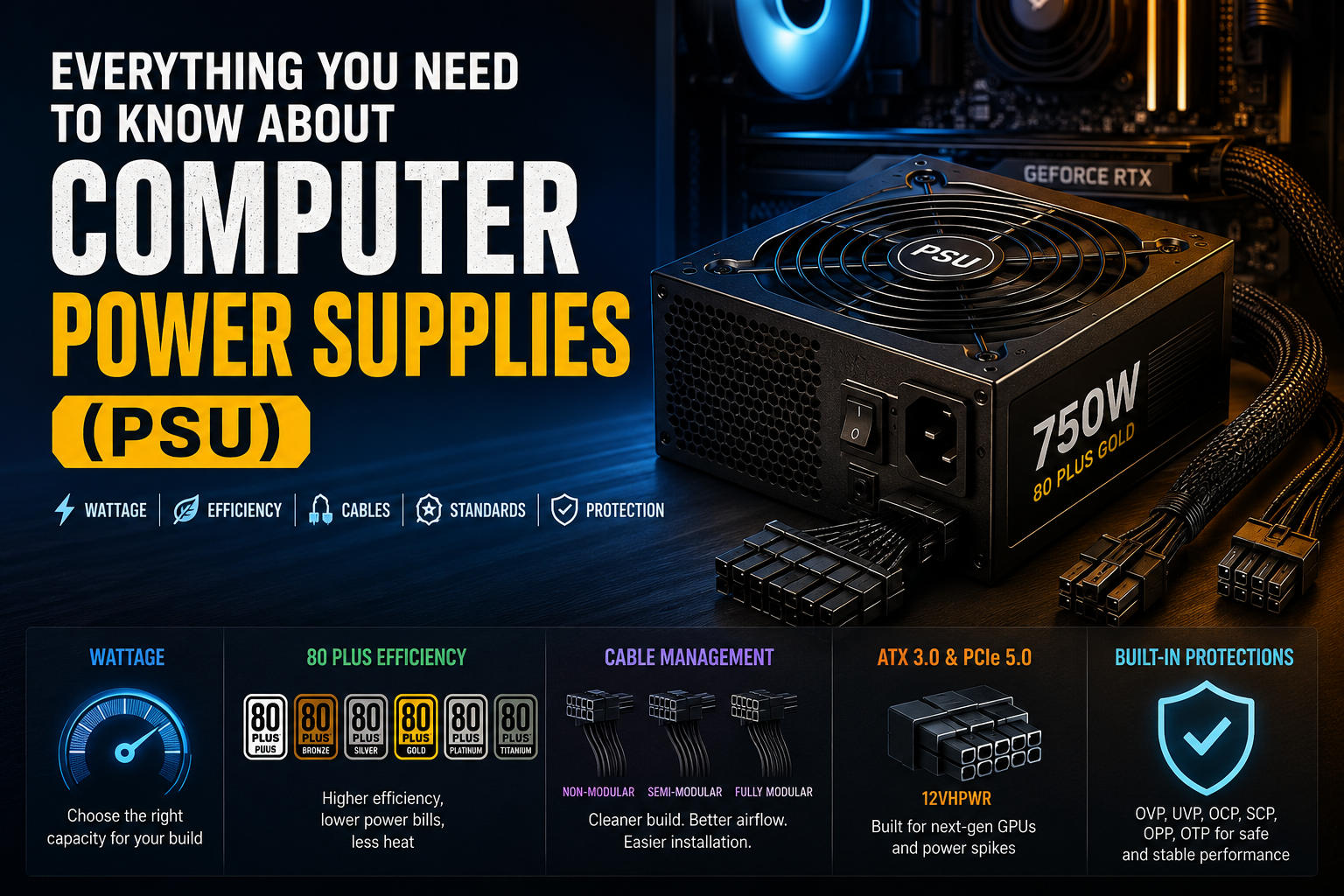
Everything You Need to Know About Computer Power Supplies (PSU)
The Power Supply Unit (PSU) is often the most overlooked component when building a PC. Many users pour their entire budget into high-end graphics cards and processors, treating the power supply as an afterthought. However, the PSU is the literal heart of your system. A low-quality or insufficient power supply can lead to system instability, random crashes, or in the worst-case scenario, catastrophic hardware failure that destroys your expensive components.
1. What is a PSU and What Does It Do?
Contrary to its name, a Power Supply Unit does not actually generate power. Instead, it converts the Alternating Current (AC) from your wall outlet into the stable Direct Current (DC) that your computer's sensitive hardware requires.
Computer components rely on specific voltage rails to function properly:
+3.3V and +5V: Used primarily by the motherboard, M.2 SSDs, and older storage drives.
+12V: The most critical rail in modern PCs. It delivers power to high-consumption components like the CPU and GPU.
2. Choosing the Right Wattage (Capacity)
The capacity of a power supply is measured in Watts (W). This represents the maximum amount of clean power the unit can deliver to your system continuously.
Common Wattage Requirements
300W - 450W: Entry-level systems, office PCs, and budget home theater PCs (HTPCs) without a dedicated GPU.
500W - 700W: Mid-range gaming and productivity systems (e.g., featuring an Intel i5/Ryzen 5 paired with an RTX 4060 or RX 7600).
750W - 1000W: High-end gaming setups and content creation workstations (e.g., Core i7/i9 or Ryzen 7/9 with an RTX 4080/4090).
1200W+: Extreme workstations, multi-GPU configurations, and heavy overclocking setups.
Tip: Always calculate your system's total power consumption using an online PSU calculator and add a 20% to 30% overhead cushion. This ensures your PSU operates within its peak efficiency curve (typically around 50% load) and leaves room for future component upgrades.
3. The 80 PLUS Efficiency Rating System
Not all power supplies convert electricity with the same level of efficiency. During AC-to-DC conversion, some energy is always lost as heat. The 80 PLUS certification indicates that a PSU is tested to be at least 80% efficient at various load levels (20%, 50%, and 100%).
The higher the efficiency rating, the less power is wasted as heat, resulting in lower electricity bills and a quieter, cooler system.
80 PLUS Certification | 20% Load Efficiency | 50% Load Efficiency | 100% Load Efficiency | Best Suited For |
|---|---|---|---|---|
80 PLUS Standard (White) | 80% | 80% | 80% | Budget & basic office builds |
80 PLUS Bronze | 82% | 85% | 82% | Entry-to-mid level gaming PCs |
80 PLUS Silver | 85% | 88% | 85% | Rare today; mostly superseded by Gold |
80 PLUS Gold | 87% | 90% | 87% | Modern gaming rigs & daily workstations |
80 PLUS Platinum | 90% | 92% | 89% | High-end creator builds & server units |
80 PLUS Titanium | 92% | 94% | 90% | Enthusiast rigs, mining, & enterprise |
4. Cable Management Types: Modular vs. Non-Modular
Power supplies come in three structural configurations regarding how their cables are attached. This drastically affects cable management, interior aesthetics, and case airflow.
PSU Type | Cable Connectivity | Pros | Cons |
|---|---|---|---|
Non-Modular | All cables are permanently soldered to the internal circuit board. | • Most affordable option. | • Cluttered case interior. |
Semi-Modular | Core cables (24-pin ATX, 8-pin CPU) are fixed; optional cables (SATA, PCIe) are detachable. | • Great balance of price and utility. | • Some fixed cables might still be unused or look messy. |
Fully Modular | Every single cable is completely detachable from the unit. | • Maximum aesthetic cleanliness. | • Most expensive variant. |
5. Form Factors (Physical Dimensions)
Before purchasing, ensure the power supply physically fits your PC case. Form factors are highly standardized:
ATX (Advanced Technology eXtended): The industry standard for traditional Mid-Tower and Full-Tower PC cases.
SFX (Small Form Factor): Significantly smaller units designed explicitly for Mini-ITX small form factor (SFF) cases.
SFX-L: A slightly elongated version of SFX that allows for a larger, quieter cooling fan.
6. The Next Generation: ATX 3.0 & PCIe 5.0
Modern high-performance graphics cards are prone to extreme, microsecond-long power spikes known as transient spikes. Traditional PSUs can interpret these sudden spikes as short circuits, triggering emergency shutdowns.
To fix this, the industry introduced the ATX 3.0 standard:
Exquisite Spike Tolerance: ATX 3.0 power supplies are engineered to sustain power spikes of up to 200% of their rated capacity for short intervals.
The 12VHPWR Connector: This native 16-pin cable delivers up to 600W of power directly to modern GPUs (like NVIDIA's RTX 40-series and newer) without needing messy 8-pin adapters.
7. Crucial Built-In Protection Suites (Industrial Standards)
Never buy a power supply that lacks standard electrical protection circuits. Look for these abbreviations on the retail box:
OVP (Over Voltage Protection): Shuts down the unit if voltages exceed safe limits.
UVP (Under Voltage Protection): Shuts down if voltages drop too low.
SCP (Short Circuit Protection): Instantly cuts power if an output short is detected, preventing fires.
OPP (Over Power Protection): Prevents the unit from being pushed way past its maximum rated capacity.
OTP (Over Temperature Protection): Shuts down the PSU if internal components overheat.
Summary Checklist for Buyers
When selecting your ideal PSU, use this search-optimized checklist:
Calculate & Pad: Determine your system wattage and add a 20-30% buffer.
Aim for Gold: Pick an 80 PLUS Gold certified unit for optimal long-term electrical savings.
Go Modular: Choose a Fully Modular PSU if your budget permits for flawless cable management.
Check ATX 3.0: If buying a high-end GPU, ensure the power supply natively supports ATX 3.0 / PCIe 5.0.
Stick to Top Brands: Only purchase from highly rated manufacturers such as Seasonic, Corsair, EVGA, Be Quiet!, Cooler Master, or ASUS.
Create a free account to react and start earning credits. Sign up
Be the first to comment (0)
Sign in to comment — you'll come straight back here.