Ultimate Motherboard Buying Guide
Here’s a little-known fact: how to choose the perfect motherboard. Compare sockets, chipsets, form factors, and VRMs to maximize performance and future-proof your PC build.
Enjoying this? Sign up to earn credits just for reading. Create free account
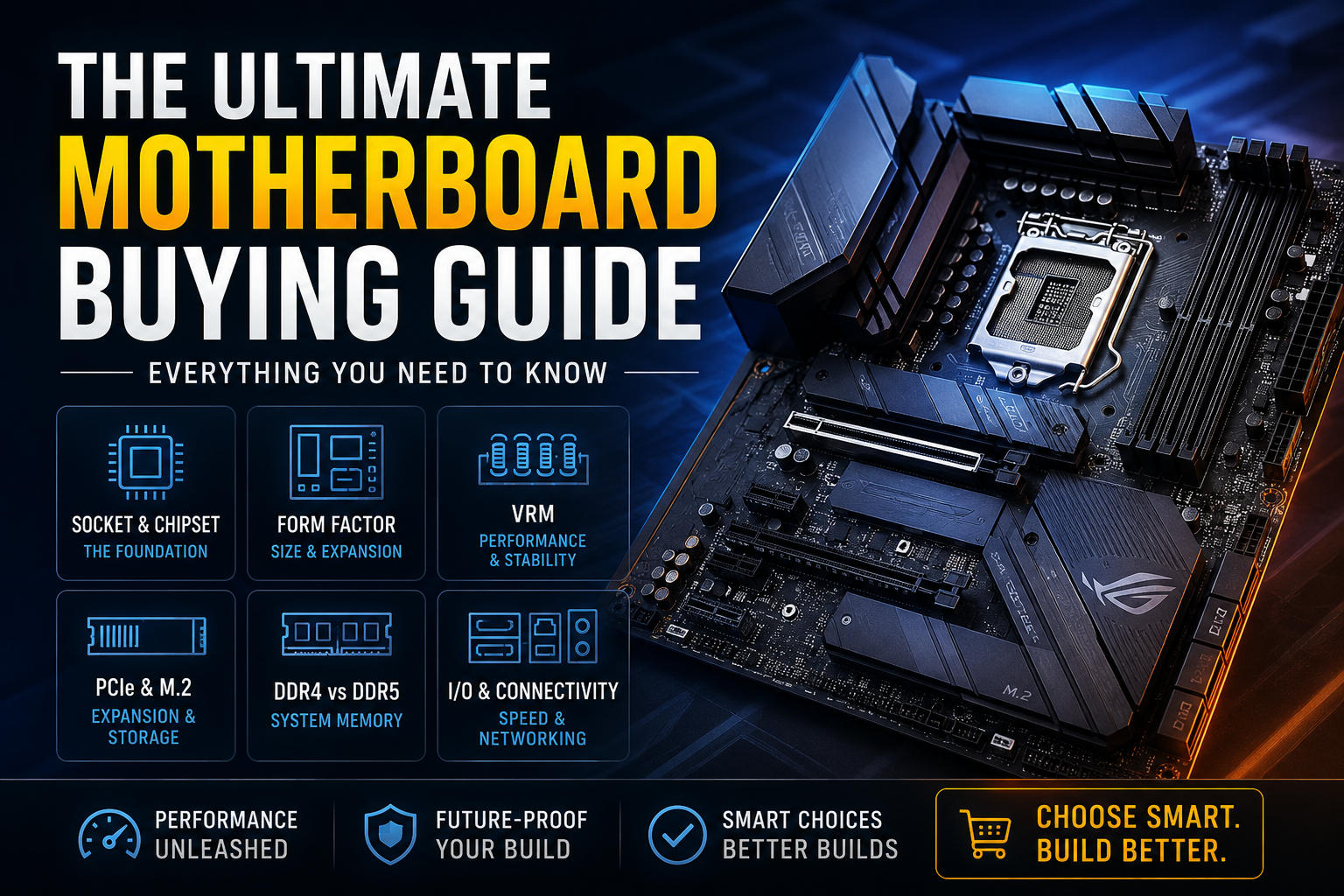
The Ultimate Motherboard Buying Guide: Everything You Need to Know
Choosing a motherboard can feel overwhelming, but it does not have to be. A motherboard is the foundation of your PC, and picking the right one helps your CPU, memory, storage, and graphics card work together smoothly. A good board also gives you better upgrade flexibility and fewer headaches down the road.
This guide is designed to make the decision easier. It focuses on the parts that matter most for real-world builds, from socket compatibility and memory support to storage, connectivity, and long-term value.
1. Socket and Chipset: The Foundation
Before you compare features, start with your CPU. Intel and AMD use different sockets, so compatibility matters from the very beginning.
Current Sockets on the Market
Intel: LGA 1700 supports 12th, 13th, and 14th Gen Core processors, while LGA 1851 is used by newer Intel Core Ultra desktop platforms.
AMD: AM5 is AMD's current mainstream desktop socket and supports Ryzen 7000, Ryzen 8000G APUs, and Ryzen 9000 series processors. AMD has also continued to position AM5 as a long-term platform for future CPU upgrades.
Understanding Chipsets
The chipset is the motherboard's traffic manager. It influences features such as PCIe lanes, storage options, USB connectivity, and how much tuning flexibility you have for memory and CPU settings.
Chipsets are often grouped like this:
Enthusiast / Flagship (Intel Z-Series / AMD X-Series): Best for high-end builds, heavy multitasking, and users who want maximum connectivity and tuning options.
Mainstream (Intel B-Series / AMD B-Series): A strong balance of features, value, and reliability for most gaming and productivity builds.
Budget / Entry-Level (Intel H-Series / AMD A-Series): Good for everyday systems and lower-power builds, but usually with fewer premium features and less flexibility.
A higher-end chipset can be useful, but it is not always necessary. The best choice depends on your CPU, budget, and how much expandability you want.
2. Form Factor: Size and Expansion Options
The motherboard size affects case compatibility, expansion room, and how much you can upgrade later.
Form Factor | Dimensions | RAM Slots | Max Full-Length PCIe Slots | Best For |
|---|---|---|---|---|
E-ATX | 305 × 330 mm | 4 or 8 | 4+ | High-end workstations, large air coolers, and advanced custom builds. |
ATX | 305 × 244 mm | 4 | 2–3 | The most popular choice for gaming and productivity builds. |
Micro-ATX (mATX) | 244 × 244 mm | 2 or 4 | 1–2 | Great value for smaller builds that still want solid expandability. |
Mini-ITX | 170 × 170 mm | 2 | 1 | Compact systems where space matters most. |
For most people, ATX is the sweet spot. It offers a strong mix of size, expandability, and price. mATX is a smart budget-friendly option, while Mini-ITX is ideal for small form factor builds but often costs more per feature.
3. VRM (Voltage Regulator Module): Performance and Stability
The VRM is responsible for delivering clean, stable power to the CPU. It is especially important if you plan to use a powerful processor, push higher clocks, or run long workloads.
Power Phases: More phases can help spread electrical load more evenly, but the real quality comes from the overall design, power stages, and cooling.
VRM Cooling: A board with solid heatsinks around the VRM area is a good sign, especially for higher-power CPUs or sustained workloads.
If you are building a mainstream gaming PC, you do not need to overthink this too much. Still, it is worth choosing a board with decent power delivery and cooling rather than the cheapest option available.
4. Expansion Slots and Storage (PCIe and M.2)
PCIe is the standard used for graphics cards, NVMe SSDs, and other fast expansion devices. PCIe 5.0 offers higher raw bandwidth than PCIe 4.0, but PCIe 4.0 is still more than enough for most current graphics cards and SSDs.
Graphics Card Slot (PCIe x16): Your main GPU should go in the top full-length slot. Metal reinforcement on the slot is a nice bonus if you have a heavy graphics card.
M.2 NVMe Storage: Fast NVMe drives are now standard for modern gaming and content creation. Boards with built-in heatsinks for M.2 SSDs are especially helpful because heat can reduce performance over time.
If you plan to install several SSDs, always check the board's manual for lane sharing and slot limitations. Some M.2 ports can reduce the availability of other connectors.
5. System Memory: DDR4 vs. DDR5
Memory support is one of the easiest things to get wrong, so double-check your motherboard before buying RAM.
AMD AM5 Platform: Supports DDR5 memory only.
Intel Platform: Some motherboards support DDR4, while others support DDR5. Make sure the board matches the memory type you plan to buy.
Memory Slots: Four DIMM slots are ideal for future upgrades, especially on ATX and mATX boards.
If you are building a new system today, DDR5 is usually the better long-term choice. It offers newer platform support and better upgrade potential, although DDR4 boards can still be a sensible budget option if you are trying to save money.
6. Rear Panel I/O and Onboard Connectivity
The rear I/O panel is easy to overlook, but it matters. A good motherboard should give you the ports you need without forcing you to buy extra adapters.
High-Speed USB: Look for USB 3.2 Gen 2 or faster ports, plus at least one USB-C connection if you use external drives or modern accessories.
Networking: A 2.5GbE port is a strong upgrade over standard Gigabit Ethernet for faster local transfers. If you want wireless connectivity, Wi-Fi 6E or Wi-Fi 7 is a strong choice.
Maintenance Features: BIOS Flashback and Clear CMOS buttons are very helpful if you ever need to recover from a failed update or unstable settings.
You do not need every premium feature on a board, but it is worth choosing one that matches how you actually use your PC.
7. Motherboard Jargon Glossary
PCIe: The interface used for graphics cards, SSDs, and other expansion devices.
XMP / EXPO: Preconfigured memory profiles that let your RAM run at its advertised speed more easily.
Dual-Channel Memory: A memory setup that uses two channels at the same time for improved bandwidth.
BIOS / UEFI: The firmware that starts your PC and controls low-level hardware settings.
8. Target Recommendations by Use Case
The Hardcore Gamer & Streamer
Recommended Chipset: Intel B760/Z790 or AMD B650/X870
Key Features: Strong VRM design, good cooling, a reinforced PCIe x16 slot, Wi-Fi 6E or Wi-Fi 7, and at least three M.2 slots if you store a large game library.
The Professional Content Creator / Video Editor
Recommended Chipset: Intel Z790 or AMD X670E/X870E
Key Features: Room for plenty of RAM, fast USB-C and Thunderbolt-style connectivity, strong storage support, and excellent expansion options.
The Budget & Casual Office Build
Recommended Chipset: Intel H610/B760 or AMD A620/B650
Key Features: Compact size, enough RAM slots for future upgrades, basic display outputs, and reliable networking.
9. Frequently Asked Questions (FAQ)
Q: Can I put an Intel CPU in an AMD motherboard (or vice versa)?
A: No. Intel and AMD use different socket designs and platform architectures, so they are not interchangeable.
Q: Does a more expensive motherboard give me more FPS in games?
A: Not directly. A premium motherboard can improve stability, memory compatibility, and upgrade options, but your GPU still has the biggest impact on gaming performance.
Q: What is the difference between Wi-Fi and non-Wi-Fi motherboards?
A: Wi-Fi models include built-in wireless networking hardware, so you can connect without extra cards or cables. Non-Wi-Fi boards usually rely on Ethernet or a separate adapter.
Final Buyer's Checklist
CPU Compatibility: Make sure the socket matches your chosen CPU exactly.
Case Size Check: Confirm your case supports the motherboard's form factor.
RAM Generation Match: Verify whether the board uses DDR4 or DDR5 memory.
Thermal Preparedness: Choose a board with good VRM cooling if you plan to use a powerful CPU or fast SSDs.
Future Upgrade Plans: Think about how many drives, USB devices, and expansion cards you may want later.
This guide is meant to make your buying decision easier, not more complicated. If you are still unsure, a mid-range board from a reputable brand is often the smartest choice for most people.
Additional Buying Tips
PCIe Lane Sharing: Some M.2 slots and SATA ports can share bandwidth, so check the manual if you plan to install several drives.
Front USB-C Header: If your case includes a front USB-C port, confirm that your motherboard has the matching header.
Audio Codec: Audio enthusiasts may want to check the onboard sound hardware, especially for higher-end headphones or speakers.
BIOS Updates: Before installing a newer CPU, verify whether your motherboard needs a BIOS update for compatibility.
RGB Compatibility: If you want lighting, make sure your board includes the headers you need for your chosen accessories.
Additional FAQ
Q: Does the motherboard increase gaming FPS?
A: It can help indirectly by improving stability and memory support, but the graphics card remains the main factor for raw gaming performance.
Q: Is PCIe 5.0 worth it?
A: For most gamers, PCIe 4.0 is still more than enough. PCIe 5.0 is more relevant for future-proofing, high-end storage, and users who want the latest platform features.
Create a free account to react and start earning credits. Sign up
Be the first to comment (0)
Sign in to comment — you'll come straight back here.