Ultimate SSD Buying Guide (2026): NVMe vs SATA, PCIe Gen 3, 4 & 5 Explained
Learn how to choose the best SSD with our complete 2026 buying guide. Compare NVMe vs SATA, PCIe Gen 3, 4 & 5, and find the perfect SSD for gaming, work, or everyday use.
Enjoying this? Sign up to earn credits just for reading. Create free account
Solid-State Drives (SSDs) have fundamentally changed how we experience technology. They turn painfully long loading screens into seconds and make aging systems feel brand new. However, navigating the modern storage market is no easy task. With a massive influx of terms like M.2, SATA, NVMe, and PCIe Gen 5, it is incredibly easy to overpay for performance you don't need or worse, buy a drive incompatible with your motherboard.
In this guide, we will break down the differences between drive types, analyze the speeds of various PCIe generations, and explain cutting-edge gaming storage technologies like Microsoft's DirectStorage.
1. Form Factor vs. Interface: Breaking Down the Confusion
The biggest point of confusion for buyers is mixing up Form Factor (the physical shape) with the Interface (how it communicates with the system).
Form Factor (Physical Shape):
2.5-inch: The traditional box shape that connects via flexible cables. M.2: The modern, slim design that looks like a stick of gum and plugs directly into the motherboard without any cables.
Interface (The Data Highway):
SATA: An older legacy interface protocol. It maxes out around 550 MB/s. NVMe (Non-Volatile Memory Express): A modern protocol built specifically for ultra-fast flash memory, utilizing the massive bandwidth of PCI Express lanes.
Crucial Tip for Link-Building: When picking an M.2 form factor SSD, ensure your motherboard slots support the matching protocol. As detailed in our Ultimate Motherboard Buying Guide, some older or budget M.2 slots only accept SATA-based M.2 drives, while modern ones fully embrace high-speed NVMe.
2. Speed Comparisons: SATA vs. NVMe PCIe Generations
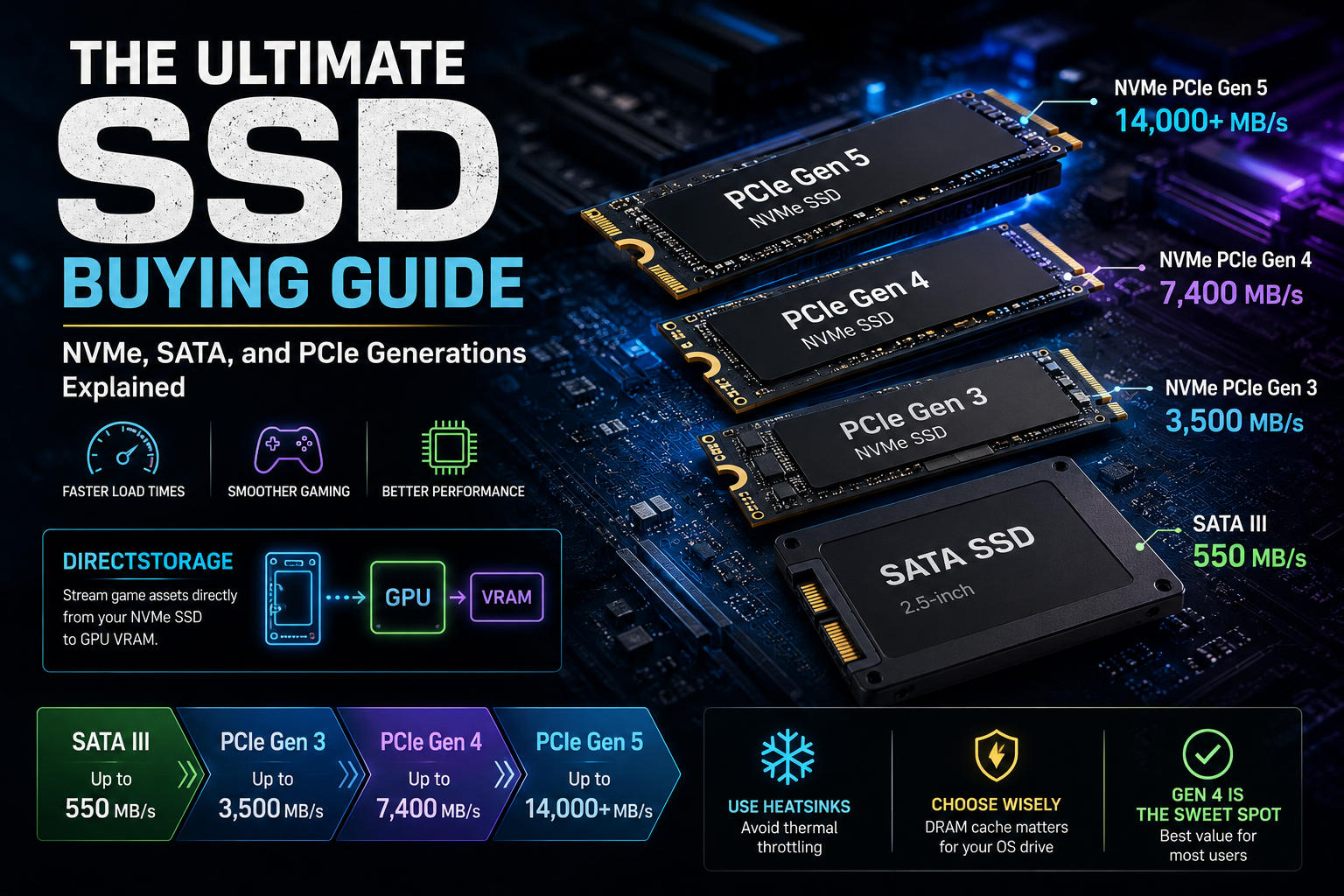
The speed of an NVMe SSD is dictated by its PCIe (Peripheral Component Interconnect Express) generation. Each new generation officially doubles the maximum available bandwidth of the previous one.
The table below showcases maximum real-world Sequential Read and Write speeds across interfaces and generations:
Interface & Protocol Tier | Form Factor Options | Average Max Read Speed | Average Max Write Speed | Best For |
|---|---|---|---|---|
SATA III SSD | 2.5-inch / M.2 | 550 MB/s | 520 MB/s | Budget Upgrades / Secondary Game Drives |
NVMe PCIe Gen 3 | M.2 | 3,500 MB/s | 3,000 MB/s | Casual Gaming / Everyday Office Tasks |
NVMe PCIe Gen 4 | M.2 | 7,400 MB/s | 6,800 MB/s | PS5 Storage Expansion / Core Gaming / Creators |
NVMe PCIe Gen 5 | M.2 | 14,000+ MB/s | 12,000+ MB/s | Enthusiast Workstations / Future-Proofing |
3. Understanding SSD Metrics: Sequential vs. Random Speeds
When reading product spec sheets, you will constantly see two types of performance numbers:
Sequential Read/Write Speeds (Measured in MB/s)
This refers to how quickly a drive can access or write large, single files that sit in a continuous block on the flash memory. This matters most when you are copying massive 4K movie files, importing gigantic video project assets, or transferring large zip folders.
Random Read/Write Speeds (Measured in IOPS)
IOPS stands for Input/Output Operations Per Second. This tracks how quickly a drive handles thousands of tiny, separate files scattered across the memory chips. This is the metric that dictates your day-to-day user experience: how fast Windows boots, how snappy your applications open, and how quickly game components load. High IOPS makes a system feel instantly responsive.
4. Game-Changing Tech: What is DirectStorage?
For years, PC games loaded data by sending compressed assets from the SSD to the system RAM, then to the CPU for decompression, and finally over to the graphics card (VPU/VRAM). This created a severe bottleneck.
Microsoft DirectStorage bypasses this legacy system. It allows compatible games to stream heavily packed asset textures straight from your fast NVMe SSD directly to the graphics card’s VRAM, letting the GPU handle decompression.
Why DirectStorage Changes Everything:
Near-Instant Load Times: It can significantly reduce loading times in supported games, although the improvement depends on the game's implementation, storage subsystem, and overall hardware.
Rich Open Worlds: Eliminates "pop-in" textures, enabling developers to build massive, highly detailed open worlds that stream instantly as you run or fly through them.
CPU Relief: Frees up valuable CPU cycles (up to 20-30% reduction in overhead), leaving more processing power for game physics and complex AI.
Note: To take advantage of DirectStorage, you need an NVMe SSD (PCIe Gen 4 or Gen 5 is highly recommended for optimal asset streaming), a compatible graphics card, and a game that supports the API.
5. Crucial Buying Traps to Avoid
Trap 1: The Lure of PCIe Gen 5 Without Proper Cooling
PCIe Gen 5 drives run incredibly hot under sustained write conditions. If you run a Gen 5 SSD without a substantial passive aluminum heatsink or a dedicated active fan, it will instantly hit thermal thresholds and bottleneck down to speeds slower than a Gen 3 drive to protect itself.
Trap 2: Buying a DRAM-less Drive for Your OS
Some ultra-budget NVMe SSDs remove the onboard DRAM cache chip to save manufacturing costs. While perfectly fine as a secondary storage drive for games, using a DRAM-less drive as your main Windows Boot OS drive can reduce sustained write performance under heavy workloads. Modern DRAM-less SSDs that support Host Memory Buffer (HMB) are still perfectly suitable for many everyday users, but DRAM-equipped models remain the better choice for primary OS drives and professional workloads.
5.5 Should You Buy PCIe Gen 5?
For most buyers, PCIe Gen 4 remains the sweet spot. While Gen 5 SSDs deliver incredible benchmark numbers, very few games and everyday applications can fully utilize their bandwidth.
User Type | Recommended SSD |
|---|---|
Everyday Office / Students | SATA SSD or NVMe PCIe Gen 3 |
Mainstream Gamers | NVMe PCIe Gen 4 |
PS5 Owners | NVMe PCIe Gen 4 |
Video Editors / 3D Artists | High-end PCIe Gen 4 or Gen 5 |
Heavy Professional Workstations | PCIe Gen 5 |
5.6 Choosing the Right Capacity
Capacity | Best For |
|---|---|
500GB | Office work and light use |
1TB | Most gamers and everyday users |
2TB | Large game libraries and content creators |
4TB+ | Professional production and archival workloads |
5.7 Popular SSD Brands
Brand | Known For |
|---|---|
Samsung | Premium performance and reliability |
WD Black | Gaming |
Crucial | Excellent value |
Kingston | Budget-friendly options |
Solidigm | Heavy workstation workloads |
6. Frequently Asked Questions (FAQ)
Q: Will a PCIe Gen 4 SSD work on a PCIe Gen 3 motherboard slot?
A: Yes. PCIe slots are completely backward and forward compatible. A Gen 4 drive will work perfectly in a Gen 3 slot, but its speed will be bottlenecked to the maximum limit of Gen 3 architecture (~3,500 MB/s).
Q: Which SSD do I need to expand my PlayStation 5 storage?
A: Sony requires a standard M.2 NVMe PCIe Gen 4 SSD with a sequential read speed of at least 5,500 MB/s. Additionally, the drive must feature an attached low-profile heatsink to fit inside the PS5's internal expansion bay.
Q: What is the lifespan of a modern SSD?
A: SSD lifespans are measured in TBW (Terabytes Written). A standard high-quality 1TB drive usually features a rating around 600 TBW, meaning you would need to write and delete 600,000 Gigabytes of data before the drive cells begin wearing out. For normal users, this takes well over a decade.
Final Buyer's Checklist
Match Your System: Verify if your motherboard supports PCIe Gen 3, Gen 4, or Gen 5 speeds before splurging on a high-tier drive.
Confirm Form Factor Space: Ensure your system has an open M.2 slot or a 2.5-inch mount available.
Verify Thermal Management: Check if your motherboard includes built-in M.2 thermal guards; if not, purchase an SSD variant that includes a factory-installed heatsink.
Prioritize DRAM for OS: Ensure your main drive features an integrated DRAM cache for a fluid operating system environment.
Create a free account to react and start earning credits. Sign up


Be the first to comment (0)
Sign in to comment — you'll come straight back here.