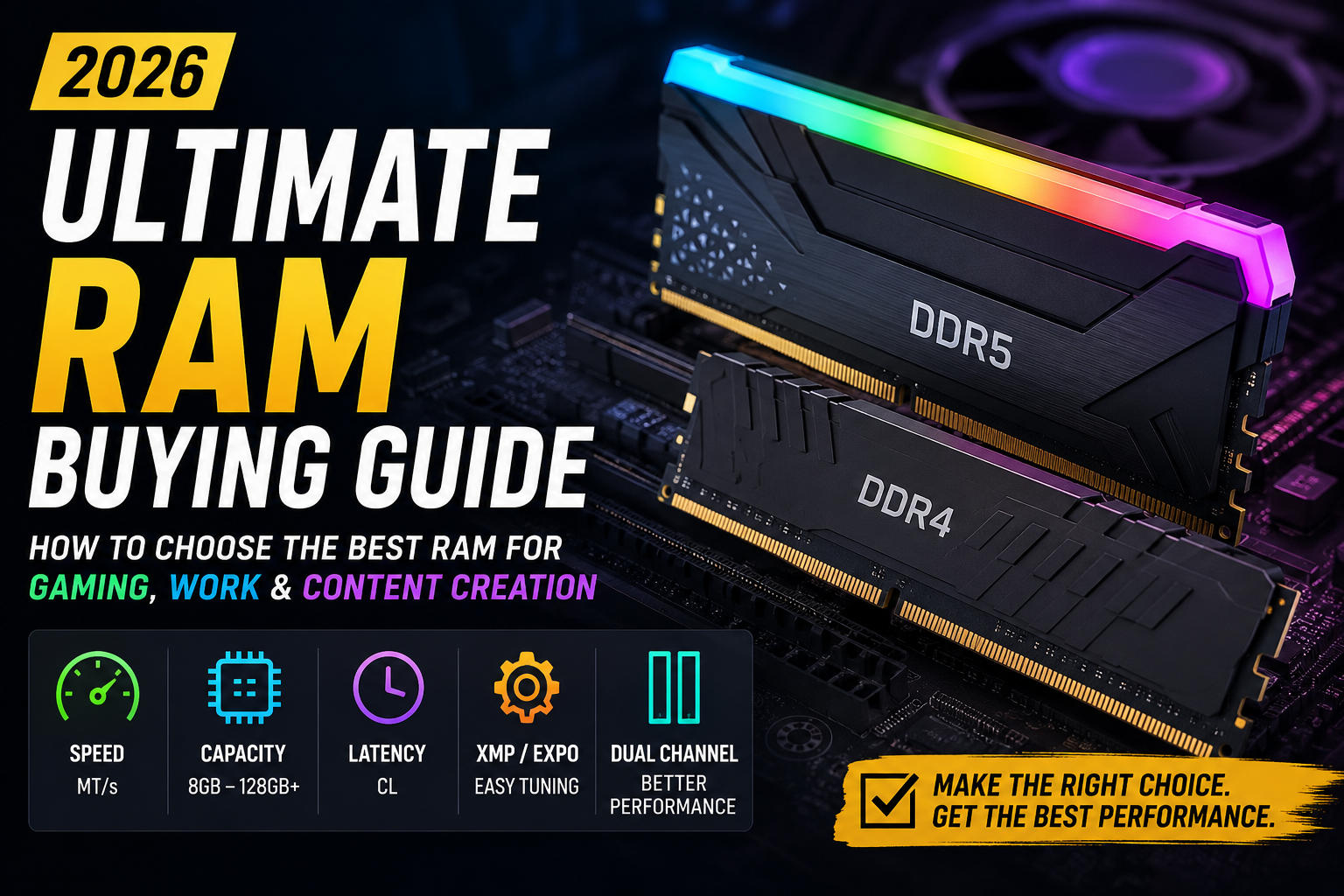
Don't Waste Money on RAM! How to Choose the Best RAM for Gaming, Work & Content Creation
Confused by DDR5, CL30, or EXPO? This complete 2026 RAM guide breaks down exactly how much memory speed and capacity you actually need for gaming and content creation.
Enjoying this? Sign up to earn credits just for reading. Create free account
Introduction
Buying RAM looks simple until you're faced with terms like DDR5, CAS Latency, XMP, EXPO, Dual Channel, and Memory Frequency. Many people spend extra money on memory that delivers little real-world benefit, while others unknowingly create performance bottlenecks by choosing the wrong kit.
This comprehensive guide explains everything you need to know before buying RAM. Whether you're building a gaming PC, editing 4K videos, programming, or simply upgrading an older computer, you'll learn how to choose the right capacity, speed, and configuration without wasting money.
1. What Is RAM?
Random Access Memory (RAM) is your computer's short-term memory. Unlike an SSD, which stores data permanently, RAM temporarily holds the files and information your CPU needs right now.
Think of it this way:
SSD = Warehouse
RAM = Workbench
CPU = Worker
A larger, faster workbench allows the worker to complete tasks more efficiently.
2. DDR4 vs DDR5: The Generational Gap
Choosing between DDR4 and DDR5 usually depends on whether you are upgrading an older system or building a brand-new setup.
Feature | DDR4 | DDR5 |
|---|---|---|
Platform Status | Mature / Legacy | Current / Future-Proof |
Typical Speeds | 2666 – 3600 MT/s | 5600 – 8000+ MT/s |
Power Management | Handled by Motherboard | On-Module (PMIC) for better efficiency |
Channel Architecture | Single 64-bit channel per stick | Two sub-32-bit channels per stick |
Price | Budget-friendly | Premium, but increasingly mainstream |
Which One Should You Buy?
Choose DDR4 if you're upgrading an existing older system or strict budget constraints force you onto a legacy platform.
Choose DDR5 if you're building a new PC. It offers vastly superior longevity and aligns with modern CPU architectures.
3. How Much RAM Do You Need?
Capacity | Best For |
|---|---|
8GB | Basic office work, web browsing, and light tasks. |
16GB | Entry-level gaming and everyday general multi-tasking. |
32GB | Modern gaming, streaming, and enthusiast desktop setups. |
64GB | Professional 4K/8K video editing, heavy virtualization, and 3D rendering. |
128GB+ | AI development, enterprise workloads, and massive data workstations. |
For most users in 2026, 32GB offers the absolute best balance between price, performance, and future-proofing.
view the Don't Waste Money on RAM! How to Choose the Best RAM for Gaming, Work & Content Creation
4. RAM Speed Explained
Memory speed (measured in Megatransfers per second or MT/s) determines how quickly data can move between the CPU and the memory modules.
Common speeds in the market include:
DDR4-3200 / DDR4-3600
DDR5-5600 / DDR5-6000 / DDR5-6400
DDR5-7200 / DDR5-8000+
While higher speeds theoretically help CPU-intensive games and professional workloads, diminishing returns apply heavily beyond the platform's "sweet spot." Furthermore, extremely high frequencies require robust hardware compatibility to run stably.
5. CAS Latency (CL)
Frequency is only half of the performance equation; the other half is latency. CAS Latency (CL) measures the delay (in clock cycles) between a command being sent to the RAM and the data becoming available.
Consider this comparison:
Kit A: DDR5-6000 CL30
Kit B: DDR5-6400 CL40
Although Kit B boasts a higher frequency, Kit A has tighter timings. In real-world desktop usage and gaming scenarios, Kit A often delivers lower total effective latency and equal or superior performance. Always evaluate speed and latency together.
6. XMP vs EXPO: One-Click Overclocking
When you first install high-speed RAM, it will default to industry-standard JEDEC speeds (often 4800 MT/s for DDR5). To reach the advertised speeds, you must enable a memory profile in your motherboard’s BIOS:
Intel XMP (Extreme Memory Profile): Designed and validated for Intel Core systems.
AMD EXPO (Extended Profiles for Overclocking): Optimized specifically for modern AMD Ryzen platforms.
Ensure you buy a kit that explicitly mentions validation for your chosen CPU ecosystem to minimize stability issues.
7. Single vs Dual Channel
How you configure your memory slots matters just as much as the capacity you buy.
Single-Channel (1×16GB): Leaves room for future upgrades but cuts your memory bandwidth in half, creating severe performance bottlenecks in modern games.
Dual-Channel (2×8GB or 2×16GB): Doubles the effective bandwidth, allowing faster multi-tasking and delivering significantly higher, smoother frame rates in gaming.
Verdict: For optimal performance, always buy a kit consisting of two identical sticks rather than a single module.
8. Compatibility & Physical Clearance
Before pulling the trigger on a purchase, you must verify compatibility across multiple fronts:
Motherboard Generation: A motherboard supports either DDR4 or DDR5. They are physically different slots; you cannot force a DDR5 stick into a DDR4 board.
QVL (Qualified Vendor List): Check your motherboard manufacturer's website for the RAM kit's model number to guarantee it has been tested and verified to work on that specific board.
CPU Memory Controller Stablity: High-end DDR5 speeds (e.g., 7200+ MT/s) put an immense strain on the CPU's Integrated Memory Controller (IMC). While a motherboard might claim support for 8000 MT/s, your specific CPU silicon might not run it stably without manual tweaking.
Physical Clearance: High-performance RAM often features tall heatspreaders or RGB diffusers. Check the height clearance of your PC case and ensure the RAM won't physically collide with large dual-tower air coolers or top-mounted Liquid AIO radiator fans.
9. ECC vs Non-ECC
ECC (Error-Correcting Code): Automatically detects and corrects data corruption in memory. It is essential for servers, scientific computing, and professional enterprise workstations where a single system crash could corrupt critical data.
Non-ECC: Lacks error-correction but operates with less overhead and lower cost. This remains the absolute best choice for gaming, home PCs, and general office builds.
10. RGB RAM & Aesthetics
RGB lighting adds visual flair to a custom PC build but has zero impact on performance. If you are on a tight budget, prioritize tighter timings or a higher capacity over RGB aesthetics, as non-RGB kits are usually more affordable and have lower physical profiles (better clearance).
11. RAM Overclocking & Stability Testing
Pushing RAM beyond its rated XMP/EXPO profile can yield minor performance gains but introduces the risk of data corruption or random system blue screens (BSODs). If you choose to manually tune timings or frequencies, utilize dedicated stress-testing software to verify absolute stability:
MemTest86: Run from a bootable USB drive to check for hardware-level defects.
Karhu RAM Test / OCCT / TestMem5 (TM5): Excellent windows-based utilities for heavy memory subsystem stress testing.
12. Common Buying Mistakes to Avoid
Cross-Generation Mixing: Buying DDR5 RAM expecting it to fit or function on a DDR4-compatible motherboard.
Running a Single Stick: Leaving massive amounts of performance on the table by not running a dual-channel configuration.
Mixing Distinct Kits: Buying two identical-looking kits at separate times and mixing them. Even if they share a model number, different manufacturing batches may use different underlying memory dies, leading to severe stability issues.
Ignoring the BIOS: Forgetting to turn on XMP or EXPO in the BIOS, leaving the RAM running at slow default base speeds.
Chasing Chimerical Speeds: Buying ultra-high frequency kits (e.g., DDR5-8000) that your CPU's memory controller cannot stably handle, resulting in crashes.
13. Best RAM Recommendations for 2026
Budget Builds: 16GB (2×8GB) DDR4-3200 CL16
Mainstream Gaming & General Use: 32GB (2×16GB) DDR5-6000 CL30 (The Golden Sweet Spot)
Professional Content Creation: 64GB (2×32GB) DDR5-6000 CL30 or DDR5-6400 CL32
Heavy Enterprise Workstation: 128GB+ (4x Modules) ECC DDR5 (Validated on Threadripper or Xeon platforms)
14. Impact on Gaming Performance
Upgrading your RAM configuration does not usually yield massive leaps in peak frame rates, but it directly improves:
1% Low FPS: Reduces random stutters and hitching, creating a noticeably smoother gameplay experience.
Asset Streaming: Helps open-world titles stream textures and assets efficiently without sudden pop-in.
High-Refresh Competitive Play: Ensures high frame-rate consistency in CPU-bound esports titles.
15. Impact on Content Creation
Professional suites rely heavily on both capacity and high memory bandwidth. Software that scales dramatically with more RAM includes:
Adobe Premiere Pro & After Effects (Extremely RAM-hungry for timeline caching)
Blender & Autodesk Maya
Unreal Engine 5 (Compiling shaders and building massive levels)
DaVinci Resolve
Rule of Thumb: For creative work, prioritize hitting your target capacity (e.g., 64GB) before paying a premium for faster frequencies.
16. RAM Buying Checklist
Have you verified whether your motherboard requires DDR4 or DDR5?
Is the kit model number present on the motherboard’s QVL?
Did you select a dual-channel kit (2 identical sticks) instead of a single stick?
Does the kit height clear your CPU cooler/case configuration?
Is the speed/latency balanced close to the platform sweet spot (e.g., DDR5-6000 CL30)?
Did you remember that you will need to enter the BIOS and enable XMP/EXPO after installation?
Frequently Asked Questions
Does faster RAM increase FPS?
Yes, but the impact is most visible when upgrading from a single-channel configuration to a dual-channel setup, or when a game is heavily CPU-bound.
Is 16GB enough in 2026?
For lightweight esports gaming and general office workflows, yes. However, modern AAA games and heavy multitasking are quickly making 32GB the required baseline for a seamless experience.
Can I mix different brands of RAM?
It is technically possible if they share identical speeds and timings, but it is highly discouraged due to underlying sub-timing differences that cause system instability.
What happens if I mix two different RAM speeds?
Your motherboard will force both modules to run at the maximum supported speed of the slowest stick installed.
Can RAM degrade or fail?
Yes. While high-quality RAM lasts for many years and often carries lifetime warranties, it can still experience failures or develop bad sectors over time due to voltage degradation or heat.
Final Thoughts
Choosing the right RAM isn't about chasing the highest frequency listed on a store shelf—it is a careful balancing act of capacity, speed, latency, platform compatibility, physical clearance, and budget.
For the vast majority of new PC builds in 2026, a 32GB DDR5-6000 CL30 dual-channel kit represents the perfect nexus of top-tier performance, excellent value, and long-term reliability.
Create a free account to react and start earning credits. Sign up
Be the first to comment (0)
Sign in to comment — you'll come straight back here.